How to disable Chrome notification? I am getting a lot of them
By Manas
Chrome notifications are the fastest way to check whether someone has opened your email. You get a notification as soon as a recipient opens your email. To avoid distraction, MailerPlex shows notification only when someone opens your email for the first time. No notifications are sent upon subsequent activities (either opens or clicks). So generally, you should get one notification per sent email, if opened. For example, if you are sending 10 emails per day and 7 are getting opened multiple times, you will only get 7 Chrome notifications.
How to switch off Chrome notifications
But if you think you are getting distracted by notifications, you can switch them off as follows. Just click on the switch shown below — if it’s blue in color, notifications are on. If the color is black, notifications are switched off.
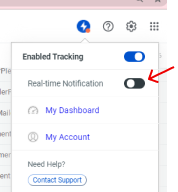
If you want to enable again, you can click on the same switch.